import json
import random
import requests
from ipywidgets import HTML
from ipyleaflet import Map, ZoomControl, GeoJSON, Popup, WidgetControl
from shapely.geometry import shape, GeometryCollection

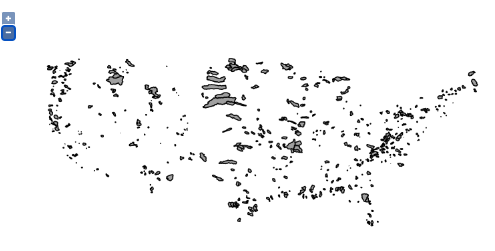
# A WFS request made to HydroShare-provisioned GeoServer to retrieve basin geometry in geojson format
url = "https://geoserver.hydroshare.org/geoserver/HS-a28685d2dd584fe5885fc368cb76ff2a/wfs?service=wfs&version=2.0.0&request=GetFeature&typeNames=HS-a28685d2dd584fe5885fc368cb76ff2a:HCDN_nhru_final_671&outputFormat=JSON"
r = requests.get(url)
geojson_str = r.content.decode("utf-8")

m = Map(center=(39, -104), zoom=4, zoom_control=False)
m.add_control(ZoomControl(position='topright'))

geo_json = GeoJSON(
    data=json.loads(geojson_str),
    style={'opacity': 0, 'fillOpacity': 0.6, 'weight': 1},
    hover_style={'color': 'cyan', 'opacity': 1, 'weight': 3, 'fillOpacity': 0},
    style_callback=lambda feature:  {'color': 'white',
                                     'fillColor': random.choice(['red', 'yellow', 'green', 'orange']),}
)

geo_json_clicked = None

def geojson_onclick_handler(event=None, id=None, properties=None, feature=None):
    global geo_json_clicked
    global hru_id
    if geo_json_clicked is not None:
        geo_json_clicked.on_hover(basin_hover_html, remove=True)
        m.remove_layer(geo_json_clicked)
    _hru_id = feature["properties"]["hru_id"]
    geom = GeometryCollection([shape(feature["geometry"])])
    bounds = geom.bounds
    swne = [(bounds[1], bounds[0]), (bounds[3], bounds[2])]
    m.fit_bounds(swne)
    geo_json_clicked = GeoJSON(
    data=feature,
    style={'color': 'black', 'opacity': 1, 'fillColor': 'cyan', 'fillOpacity': 1},
    )
    m.add_layer(geo_json_clicked)
    geo_json_clicked.on_hover(basin_hover_html)
    basin_click_html(feature)
    # update global hru_id
    hru_id = _hru_id

geo_json.on_click(geojson_onclick_handler)
m.add_layer(geo_json)
html_click = HTML('''Click on a basin to start modeling''')
html_click.layout.margin = '0px 20px 20px 20px'
control_click = WidgetControl(widget=html_click, position='topleft')
m.add_control(control_click)

html_hover = HTML('''Hover over to check hru_id''')
html_hover.layout.margin = '0px 20px 0px 20px'
control_hover = WidgetControl(widget=html_hover, position='bottomright')
m.add_control(control_hover)

def get_feature_by(geojson_layer, key, value, first=False):
    out = []
    for fea in geojson_layer.data['features']:
        if fea["properties"][key] == value:
            if first == True:
                return fea
            out.append(fea)
    return out

def check_url(url):
    # check if a url is reachable
    return requests.head(url).status_code == 200

def img_html(url, alt, link=None):
    img_value = '<img src="{url}"  alt="{alt}" width="100" height="600">'.format(url=url, alt=alt)
    if link is not None:
        img_value = '<a href="{link}" target="_blank"> {img_value} </a>'.format(link=link, img_value=img_value)
    return img_value

def basin_click_html(feature,  **kwargs):
    hru_id = feature['properties']["hru_id"]
    watershed_url = "https://ral.ucar.edu/staff/wood/watersheds/basin_figs/{hru_id}.watershed.png".format(hru_id=hru_id)
    dem_url = "https://ral.ucar.edu/staff/wood/watersheds/dem_figs//{hru_id}.dem.png".format(hru_id=hru_id)
    fields = ["hru_id", "lon_cen", "lat_cen", "AREA", "elev_mean", "Perimeter"]
    table_row_tmpl = '''<tr><th scopt="row">{}</td><td>{}</td></tr>'''
    tbody_value = ''
    for field in fields:
        row = table_row_tmpl.format(field, feature['properties'][field])
        tbody_value = tbody_value + row

    html_value = '''<h4><b>Selected Basin</b></h4>
    <table class="table table-striped"><tbody>{tbody_value}</tbody></table>'''.format(tbody_value=tbody_value)
    if check_url(watershed_url):
        html_value = html_value + img_html(watershed_url, "Watershed Boundary", link=watershed_url)
    if check_url(dem_url):
        html_value = html_value + img_html(dem_url, "DEM", link=dem_url)
    html_click.value = html_value

def basin_hover_html(feature,  **kwargs):
    hru_id = feature['properties']["hru_id"]
    html_value = '''<h5><b>{hru_id}</b></h5>'''.format(hru_id=hru_id)
    html_hover.value = html_value

geo_json.on_hover(basin_hover_html)
m